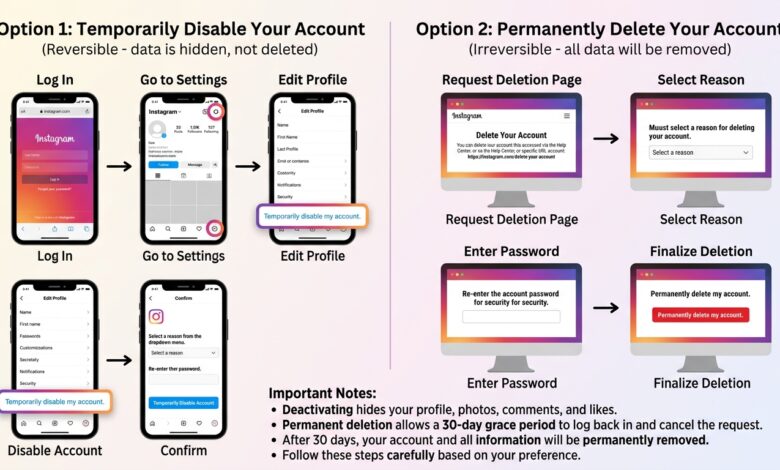
Instagram is one of the world’s most popular social media platforms, but many users decide to leave it for privacy, productivity, or personal reasons. If you’re looking for a simple way to delete your Instagram account, this guide explains everything you need to know.
Whether you want to permanently remove your account or temporarily disable it, we’ll walk you through every step.
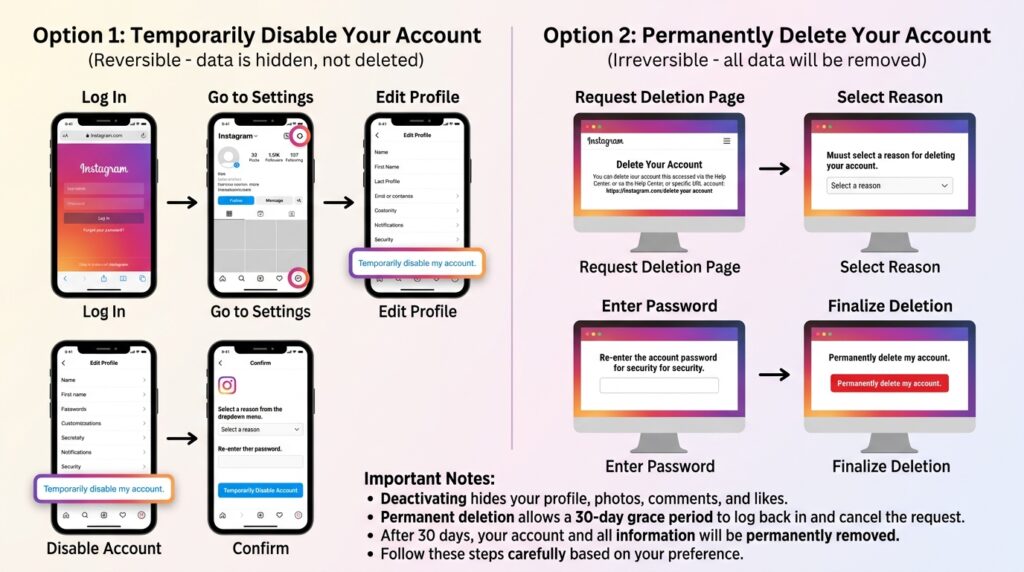
Can You Delete an Instagram Account?
Yes. Instagram offers two options:
- Permanently delete your account
- Temporarily deactivate your account
Deleting your account removes all your photos, videos, messages, followers, and profile permanently. Deactivating simply hides your profile until you log back in.
Before You Delete Your Instagram Account
Before deleting your account, remember:
- Download your Instagram data.
- Save important photos and videos.
- Inform your followers if needed.
- Cancel any Meta subscriptions.
How to Delete Instagram Account on Mobile
Follow these steps:
- Open the Instagram app.
- Tap your profile.
- Tap the menu (☰).
- Go to Settings and Privacy.
- Tap Accounts Center.
- Select Personal Details.
- Tap Account Ownership and Control.
- Choose Deactivation or Deletion.
- Select your account.
- Tap Delete Account.
- Enter your password.
- Confirm your decision.
Your account will be scheduled for deletion.
How to Delete Instagram Account on PC
You can also delete your account using a web browser.
- Log in to Instagram.
- Open Accounts Center.
- Navigate to Personal Details.
- Select Account Ownership and Control.
- Click Delete Account.
- Confirm your password.
- Submit your request.
How to Temporarily Deactivate Instagram
If you’re unsure about deleting your account, temporarily deactivate it.
Steps:
- Open Instagram.
- Go to Settings.
- Select Accounts Center.
- Choose Deactivation.
- Confirm your password.
Your profile will disappear until you log in again.
What Happens After Deleting Your Instagram Account?
After requesting deletion:
- Your profile becomes unavailable.
- Photos and videos are removed.
- Messages disappear.
- Followers are removed.
- Username may become available later.
- You usually have a grace period to cancel the deletion by logging back in before the deletion is finalized.
How to Download Instagram Data
Before deleting:
- Open Instagram Settings.
- Go to Your Activity.
- Choose Download Your Information.
- Enter your email.
- Wait for Instagram to send your data.
Can You Recover a Deleted Instagram Account?
If the deletion process has not been completed and you’re still within Instagram’s cancellation window, logging back in may stop the deletion. Once the account is permanently deleted, it generally cannot be recovered.
Reasons People Delete Instagram
Many users delete Instagram because they want to:
- Improve productivity
- Reduce screen time
- Protect their privacy
- Avoid social media distractions
- Start fresh with a new account
Delete vs Deactivate Instagram
| Feature | Delete | Deactivate |
|---|---|---|
| Permanent | Yes | No |
| Photos Removed | Yes | No |
| Followers Lost | Yes | No |
| Can Return | No (after permanent deletion) | Yes |
| Hidden Profile | Yes | Yes |
Frequently Asked Questions
Is deleting Instagram permanent?
Yes. Once the deletion process is complete, your account and its content cannot usually be recovered.
Can I deactivate instead?
Yes. Deactivation hides your profile without permanently deleting your data.
Will my messages disappear?
Your account is removed, though some message history may still appear in recipients’ inboxes depending on Instagram’s policies.
Can I create another Instagram account later?
Yes. You can create a new account at any time.
Final Thoughts
Deleting your Instagram account is simple once you know where to find the settings. If you’re only taking a break, consider deactivating your account instead. If you’re certain you no longer need Instagram, download your data first, then follow the deletion steps carefully to avoid losing important memories.